 FileWink
What are JPG and JPEG?
JPEG is an image format commonly used for photographs. JPG is the shorter spelling of the same file extension. It became common when some operating systems limited extensions to three characters. Both endings identify the same kind of image, so either works here. Renaming an unrelated file with one of those endings leaves its underlying format unchanged.
JPEG compression helps phone photos and camera exports stay small by discarding some image detail. A PDF serves a different purpose. It keeps a set of pages in a defined order that is easy to open, print or attach to a form. Here, each selected image becomes one page. The page follows the image’s aspect ratio, so a portrait scan stays tall and a landscape photo stays wide.
Why combine images into one PDF?
A photographer can put a cover image first and arrange the rest of a portfolio to guide a client through a project. Someone scanning a signed agreement with a phone can put the signature page after the terms and send a single attachment. Both recipients can move through the images in order with a standard document reader.
For a job or school application with one attachment field, combine the required certificates and supporting scans in the order the form specifies. For an expense claim, put receipts in the same order as the entries on your expense report. Check each total, transaction date and currency before submitting. Keeping the source images separately gives you a clean copy if you need to correct a page later.
How to convert JPG to PDF
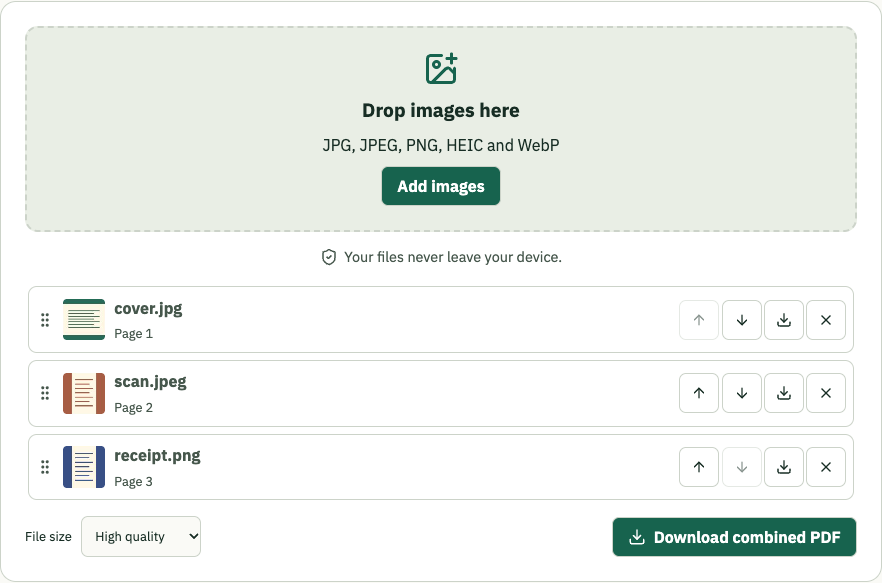
- Add images. Drop your files into the converter or choose them from your device. You can mix photos and scans in the same batch. The converter also accepts PNG, HEIC and WebP images.
- Set the page order. Drag a row by its handle or use the up and down buttons. Check the thumbnails against the required order and remove any duplicate or unwanted page.
- Download the result. Use Download combined PDF to export the list as one document. For just one page, use the download button beside that image. Open the saved file and check the page sequence before sending it.
How to keep the PDF under 300 KB or 500 KB
If an application portal caps attachments at 300 KB or 500 KB, select that target under File size before downloading. The converter checks the PDF size and uses smaller or more compressed images where needed. A target applies to the whole download, so each page in a ten-page file has much less room than the same page exported on its own.
Check the saved file size and zoom in on the smallest text. If the result is still too large, crop blank borders from the originals and remove duplicate pages. For a strict limit, choose 300 KB if the portal allows up to 500 KB and you want extra room. If addresses, dates or signatures become difficult to read, try a smaller batch or return to High quality when the destination allows a larger file.
Security and privacy
Your files never leave your device. The site delivers the page and any decoder code needed by your browser. The browser reads the selected images, generates previews and assembles the PDF locally. No server receives the source photos or the resulting document. This matters when the pages contain addresses, signatures, identity documents or receipts.
Closing or reloading the tab clears the converter’s list. A PDF you downloaded remains wherever your browser saved it, and the original images remain in their existing locations. If you use a shared device, check the downloads folder after sending a sensitive document. Read how the site handles local files in the privacy notes.